
Cybersecurity
Simple Steps to Secure Your Smart Cameras, Doorbells, and Routers From Hackers
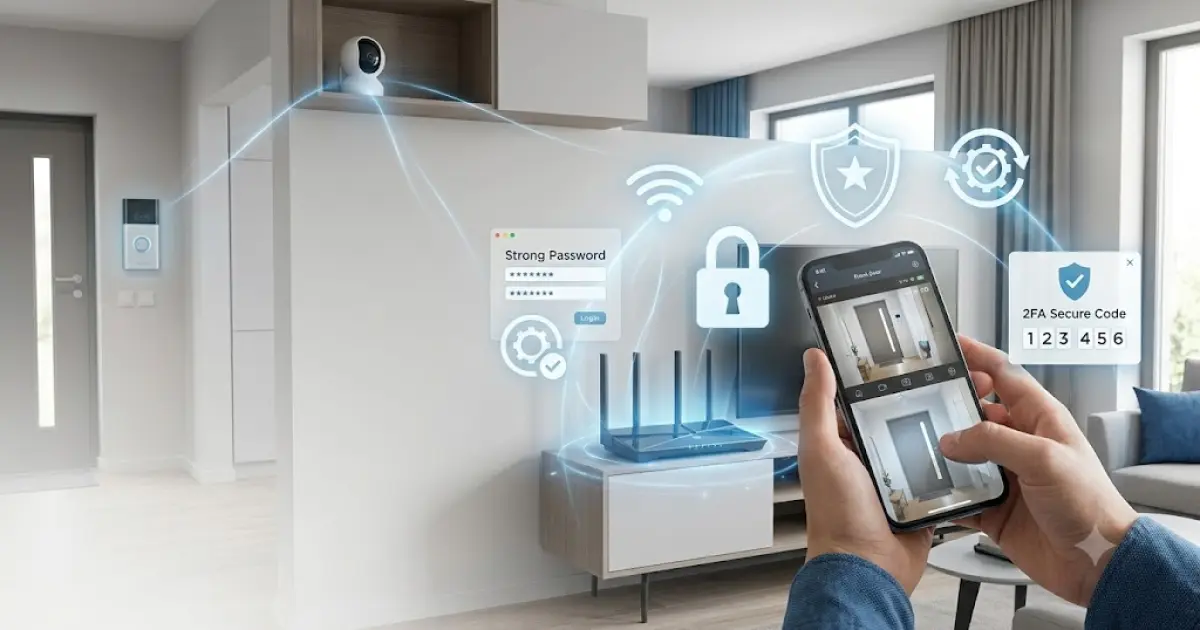
Smart cameras, video doorbells, and wireless routers have made home security and internet access much easier. You can check your front door from your phone, receive alerts when someone approaches your home, and connect many devices to the internet without complicated wiring. However, internet-connected devices can also create security risks if they are not properly protected. Hackers may try to access weak passwords, outdated software, or poorly secured networks. The good news is that protecting these devices does not have to be difficult. With a few simple steps, homeowners can reduce common security risks and make their smart home devices safer.
Start With Strong and Unique Passwords
One of the easiest ways to protect smart devices is to use strong, unique passwords. Avoid simple passwords such as your name, birthday, phone number, or common words.
Your camera, doorbell, router, and online accounts should not all use the same password. If one account is compromised, hackers could otherwise try the same password on your other devices.
For websites that publish home security advice, a Free Security WordPress Theme can provide a useful foundation for sharing security guides, device reviews, privacy tips, and technology news. A well-organized security website can help homeowners find simple information about protecting their connected devices.
Use long passwords that combine different types of characters when supported. A password manager can also help you create and safely store unique passwords for different accounts.
Change Default Login Details
Many smart devices come with a default username or password. Leaving these details unchanged can make a device easier to attack.
When setting up a new camera, doorbell, or router, change the default login information immediately. Follow the manufacturer's instructions for creating a new administrator password.
Do not share your administrator password with people who do not need access to the device.
If several family members need to use a camera or doorbell, check whether the device allows separate user accounts. This is generally better than sharing one administrator login with everyone.
Turn On Two-Factor Authentication
Two-factor authentication, often called 2FA, adds another layer of protection to an account.
With 2FA enabled, a password alone is not enough to sign in. Depending on the service, you may need to enter a temporary code or approve a login using another trusted method.
Enable 2FA on your camera, doorbell, router management account, cloud account, and related apps whenever the manufacturer provides it.
This can make it much harder for someone to access your account using a stolen or guessed password.
Keep Devices Updated
Smart devices use software that can contain security weaknesses. Manufacturers regularly release firmware and software updates to fix bugs and security problems.
Check whether your camera, doorbell, and router support automatic updates. If they do, enabling automatic updates can make maintenance easier.
If automatic updates are not available, check the manufacturer's app or website regularly for new firmware.
Do not ignore security update notifications. An old device running outdated software may have known weaknesses that attackers can try to exploit.
Secure Your Home Wi-Fi
Your router is one of the most important devices in your smart home because many other devices connect through it.
Use a strong administrator password and update the router's firmware when updates are available.
Your Wi-Fi network should also use a modern security standard supported by your router and devices. Avoid leaving your wireless network open without a password.
If your router offers a separate guest network, consider using it for visitors rather than sharing your main Wi-Fi password.
Create a Separate Network for Smart Devices
Some modern routers allow users to create a separate network for smart-home devices. This can provide an additional layer of separation between cameras, doorbells, computers, phones, and other personal devices.
For example, your laptop may contain important documents while your smart camera mainly needs internet access.
Separating devices can help limit the potential impact if one smart device is compromised.
Check your router's documentation to see whether it supports guest networks, IoT networks, or network isolation.
Disable Features You Do Not Need
Smart devices often include many features, but you may not need all of them.
Review the settings for your camera, doorbell, and router. If a feature is unnecessary, consider disabling it when the manufacturer allows this safely.
For example, remote access, unused accounts, or certain connectivity features may not be necessary for every household.
Reducing unnecessary features can also make your device easier to manage.
However, do not disable security features simply because you are unfamiliar with them. Check the manufacturer's documentation first.
Protect Your Camera and Doorbell Accounts
Smart cameras and doorbells can contain sensitive video and audio information. Protecting the associated account is therefore extremely important.
Use a unique password and enable 2FA if available. Check which users have access to the device and remove accounts that are no longer needed.
If the app provides login history or security notifications, review them regularly.
You should also check whether your camera stores recordings locally, in the cloud, or both. Understanding where your recordings are stored can help you make better privacy decisions.
Place Cameras Carefully
Cybersecurity is important, but physical security also matters.
Place outdoor cameras where they can monitor important areas without being easy to reach. Avoid locations where someone could easily unplug, damage, or steal the device.
At the same time, make sure cameras are not pointed into areas where privacy could be a concern.
For indoor cameras, think carefully about where they are installed. Avoid placing cameras in private spaces unless there is a clear and appropriate reason to do so.
Review App Permissions
The smartphone app connected to your smart camera or doorbell may request access to your location, microphone, camera, contacts, storage, or notifications.
Review these permissions and understand why they are needed.
Only provide permissions that are necessary for the device to work correctly. If an app requests access that does not appear relevant, check the manufacturer's privacy information before allowing it.
Keep the smartphone itself protected with a screen lock, current software, and a secure account.
Watch for Suspicious Activity
Pay attention to unusual behavior from your smart devices.
Unexpected camera movements, unknown login alerts, unfamiliar users, changed settings, or unexpected notifications can be warning signs that an account or device needs attention.
If you notice something unusual, change your password and review connected accounts. Check whether the manufacturer provides a way to sign out other sessions or devices.
If you believe an account has been compromised, follow the manufacturer's account recovery and security instructions.
Be Careful With Phishing Messages
Hackers do not always attack devices directly. They may try to trick users into giving away passwords.
You may receive an email or message claiming that your camera account has a problem and asking you to click a link and sign in.
Be careful with unexpected security messages. Instead of clicking a suspicious link, open the official app or type the company's known website address yourself.
Never share verification codes or passwords with someone who contacts you unexpectedly.
Choose Reputable Smart Devices
Price should not be the only factor when buying a smart camera, doorbell, or router.
Research the manufacturer's security practices, update policy, privacy information, and customer support before purchasing.
Some inexpensive devices may receive limited software support. A device that stops receiving security updates can become harder to protect over time.
For technology and security websites, premium Themes can also provide advanced design options for publishing detailed device reviews, cybersecurity guides, product comparisons, and smart-home resources. However, website design should always support useful information rather than distract readers from practical security advice.
Remove Old Devices From Your Network
When replacing an old camera, router, or doorbell, do not simply unplug it and leave the account active.
Remove the device from your account and reset it according to the manufacturer's instructions before giving it away, recycling it, or disposing of it.
This reduces the chance that an old device remains connected to your account or contains stored information.
Also review your router's connected-device list from time to time. If you see a device you do not recognize, investigate it.
Keep Your Router in a Safe Location
The router is often overlooked, but it controls access to your home network.
Keep it in a secure location where strangers cannot easily access its reset button, cables, or administrator information.
Avoid placing passwords or network details on a label where visitors can easily see them.
If your router has a physical reset button, understand how it works so you can restore the device safely if necessary.
Make Security a Regular Habit
Smart-home security is not something you should think about only during installation.
Every few months, review your passwords, connected devices, software updates, account users, and privacy settings.
Remove old accounts and devices, install available security updates, and check your router settings.
These small habits can make a significant difference over time.
Final Thoughts
Smart cameras, doorbells, and routers can make everyday life more convenient and provide useful security features, but they need proper protection. Strong passwords, two-factor authentication, software updates, secure Wi-Fi, and careful account management are some of the easiest ways to reduce common risks.
Homeowners should also pay attention to physical camera placement, app permissions, suspicious messages, and old devices that are no longer being used.
You do not need to be a cybersecurity expert to improve your smart-home security. Start with the basics, keep your devices updated, and regularly review your settings. A few minutes of maintenance can help protect your devices, network, privacy, and personal information from common online threats.


0 Comments
No comments yet. Be the first to respond.
Log in to comment